
Marigold Bridge AI Video Generator
Marigold Bridge turns one photo of a loved one into the Coco-style video from TikTok: they walk across a glowing field of cempasúchil at night, cup a handful of petals, then appear in a golden Day of the Dead frame. Add a photo, wait a few minutes, and download a 12-second vertical video.
12-second vertical video, silent. Failed videos are refunded automatically.
How to make a Marigold Bridge video
Three steps, no editing app and no template to find.

1.Add one photo
Choose a clear photo of one person with the face easy to see. Waist-up works best, and old scanned prints are fine. Tick the box to confirm you may use the photo.
2.Pick the quality and let it render
Standard 480p is enough for sharing in a chat, and HD 720p looks sharper on a big screen. The price shows on the button before you press it. It takes a few minutes and you can close the page.
3.Watch and download
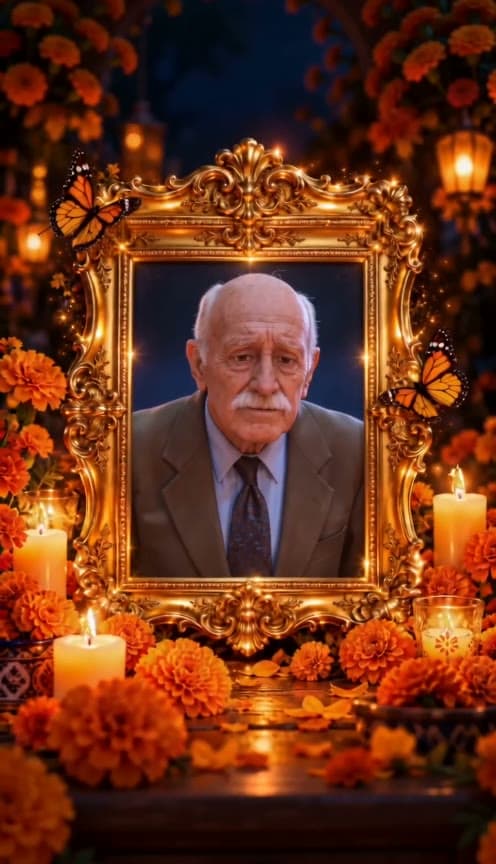
The video ends on the golden frame with your photo. It is saved in My videos, ready to download as a vertical MP4.
What is the Marigold Bridge trend?
The marigold bridge comes from Coco, the 2017 Pixar film about Día de Muertos. In the story, a bridge of glowing cempasúchil (marigold) petals joins the land of the living and the land of the dead. On Día de Muertos, families lay marigold petals in paths so their dead can find the way home to the ofrenda.
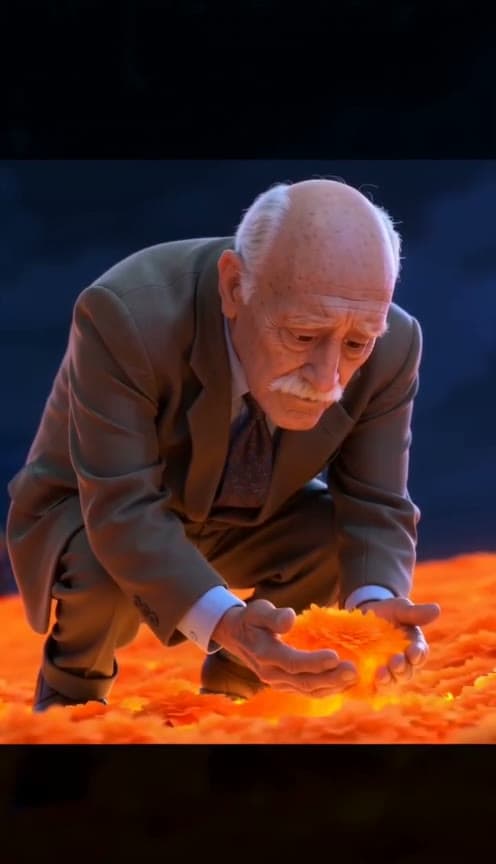
In the weeks before Día de Muertos, short videos built on that image started circulating on TikTok. They share one caption in Spanish: “No lo dejen solito, es su primera vez cruzando el puente de cempasúchil”, which means “Don’t leave them alone, it’s their first time crossing the marigold bridge.” A person walks into a field of marigolds at night, kneels, scoops up glowing petals, and the clip ends on a framed photograph surrounded by candles.
Most of these videos were made with CapCut templates, so you needed the app, the right template and some patience. Marigold Bridge does the same thing in the browser from a single photo.
What your Marigold Bridge video shows
Every video follows the same short story, about 12 seconds long, in a vertical 9:16 frame so it fits TikTok, Instagram Reels, WhatsApp Status and YouTube Shorts.
0–8 seconds: the marigold field
Your loved one is redrawn as a warm, Coco-style 3D animated character, keeping the face shape, hair and clothing colours from your photo. They walk slowly across a night field of orange marigolds, stop, crouch, and lift a handful of glowing petals in both hands.
A beat of black
The picture cuts to black for one second. It is the pause the trend uses before the ending.
9–12 seconds: the golden frame
The video ends on an ornate golden frame ringed with marigolds, candles, lanterns and orange butterflies, with the original photograph inside it, as in the trend.
Who makes Marigold Bridge videos, and for what
Remembering a grandparent or parent
The most common use. A photo of someone who has passed becomes a short piece to share with family on the first or second of November.
Honouring a pet
People also make the video for a dog or cat that has died. Pets are welcome as long as the photo shows the face clearly.
A first Día de Muertos without them
The original caption is about someone’s first crossing. If this is your first year without a person, a short video can be a gentle way to mark it.
Creators following the trend
If you make Día de Muertos content, you can use the video for your own relatives or with a family’s permission. Do not make one for a stranger without asking.
Making one with care
A memorial video is personal, and an AI video is not a memory. It is an artwork made from a photograph. A few habits help it land well.
Ask the family first if the person was also family to others. Follow your own family’s customs on when to share it. Keep the AI label that the app you post to asks for, so no one mistakes the video for a recording. If you are unsure, keep the video private and watch it with the people who knew them.
Some photos will not work well: group photos, very small faces, heavy filters and photos where the face is covered. Use a single, sharp, front-facing photo. The result can differ from run to run, and if a video fails to render your credits come back automatically.
Marigold Bridge vs CapCut templates and other generators
How this site differs from the ways people make the marigold bridge video today.
| Marigold Bridge | CapCut template | General AI video tools | |
|---|---|---|---|
| Needs an app | No, works in your browser | Yes, CapCut and TikTok | Usually an account and a prompt |
| What you provide | One photo | Photos placed into a fixed layout | A photo plus a prompt you write |
| Coco-style character | Yes, built in | Depends on the template | You describe it yourself |
| Golden-frame ending | Included | Depends on the template | Not included |
| Watermark | None | Template-dependent | Often on free plans |
| Language | English and Spanish | Spanish templates | Mostly English |
| Price | $6.67–$9.99 per standard video, no subscription | Free, with your own editing | Subscription or credits |
Pay per video, no subscription
Buy a credit pack once and use it within a year. A 480p video costs 100 credits and a 720p video costs 200.
Single
One standard video, to try it on one photo.
- 100 credits
- 1 standard video
- Credits valid for 12 months
- Failed videos refunded automatically
Starter
Three standard videos, or one HD, with room for retakes.
- 300 credits
- 1 HD video or 3 standard
- Credits valid for 12 months
- Failed videos refunded automatically
Creator
A video for every relative, with plenty of retakes.
- 900 credits
- 4 HD videos or 9 standard
- Credits valid for 12 months
- Failed videos refunded automatically
Marigold Bridge FAQ
Short answers about the trend, the video and your photos.